You liked it.
Now you can find it.

Nota keeps everything you like
in one app you can search.

Free. You need the app + the Chrome extension. No account.

  • X

    Marit Olsen @maritbuilds

    Spent a week on a custom date picker. Deleted it. The native one was fine.

  • Reddit

    r/Breadit

    After 41 failed loaves, the only sourdough schedule that worked for me

  • GitHub

    tauri-apps/tauri

    Build smaller, faster, and more secure desktop apps

  • YouTube

    Quiet Interfaces

    Why good software feels calm

  • Hacker News

    Hacker News

    SQLite is faster than you think for reads

  • Bluesky

    Tomás Rivera @tomasr

    The Lisbon tram map teaches more about hierarchy than most design books.

  • Instagram

    @ceramics.by.noor

    Glaze test 14. Finally the blue I wanted.

Try it: click any post.
5
Dana Whitfield @danaw

Every settings page is a list of arguments your team never finished having.

2h
ollama/ollama

Get up and running with large language models locally

1d
Priya Raman @priyatypes

Rust tip: if the borrow checker hates your design, it may have a point.

6d#read later
r/AskCulinary

Why does my pasta water matter this much

5h#reddit-saved
Slow Workshop

Building a shoji screen by hand

3d
Saved to Nota

Click like you always do

Star, like, upvote or save. Nota keeps the post the moment you click, and you don't change a thing about how you browse.

Or save any page by hand

Use the toolbar button, the right click menu, or ⌥⇧SAltShiftSAlt Shift S

It goes straight to the app

From the extension to the app on your computer. App closed? The extension holds your saves and sends them the next time it opens.

Then find it again

Search everything, filter by site, and sort things into folders and tags.

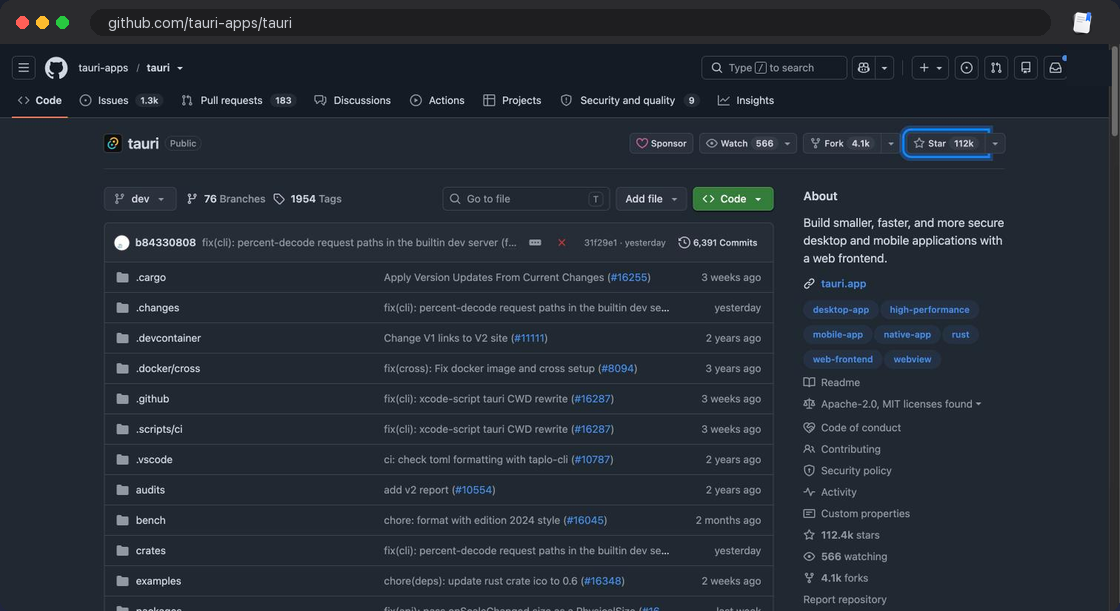
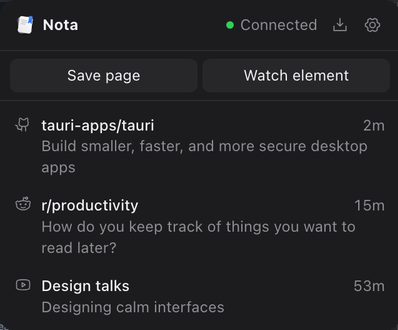
A GitHub repository open in Chrome, with the Star button highlightedThe Nota extension popup, listing recent saves from GitHub, Reddit and YouTube1
The Nota app showing a grid of saved posts, with a sidebar of sites and a search field
Saved to Nota
No server in between
tauri-apps/tauri

Build smaller, faster, and more secure desktop apps

now

Remember one word.
That's enough.

Every word you type has to match, and tags count. This is the real rule from the app, running on 23 sample saves. Try it.

Dana Whitfield @danaw

Every settings page is a list of arguments your team never finished having.

2h
r/AskCulinary

Why does my pasta water matter this much

5h#reddit-saved
ollama/ollama

Get up and running with large language models locally

1d
Slow Workshop

Building a shoji screen by hand

3d
Priya Raman @priyatypes

Rust tip: if the borrow checker hates your design, it may have a point.

6d#read later
Marit Olsen @maritbuilds

Spent a week on a custom date picker. Deleted it. The native one was fine.

12m
r/Breadit

After 41 failed loaves, the only sourdough schedule that worked for me

12m
tauri-apps/tauri

Build smaller, faster, and more secure desktop apps

12m
Quiet Interfaces

Why good software feels calm

12m
Hacker News

SQLite is faster than you think for reads

12m
Tomás Rivera @tomasr

The Lisbon tram map teaches more about hierarchy than most design books.

12m
@ceramics.by.noor

Glaze test 14. Finally the blue I wanted.

12m
r/rust

A gentle explanation of lifetimes, with drawings

2w#read later
Hacker News

How we cut our build times from 9 minutes to 47 seconds

3w
@smallkitchenbaking

Sourdough focaccia, no mixer, 18 hour rise. Recipe in caption.

1mo#recipes
Type Foundry Diaries

Drawing a typeface in 30 days

1mo
Hana Sato @hanasato

A checklist for design reviews that nobody on my team hates.

2mo#read later
BurntSushi/ripgrep

Recursively search directories for a regex pattern

2mo
Leo Fontaine @leofontaine

Cheapest flight trick nobody tells you: fly on the day the airline moves its planes back.

4mo#x-bookmarks
r/Cooking

The one soup recipe I make every single week

5mo#recipes
Hacker News

Show HN: A tiny Rust library for reading PDFs

7mo
Ana Lima @analima

Good onboarding is mostly deleting steps. Design the shortest path, then delete one more.

9mo#x-likes
Ferment Club

Sourdough starter rescue, step by step

1y#recipes

You already did the hard part. You found the good stuff. Nota makes sure you can find it twice.

Small things that make it useful

It's a plain tool that keeps what you click and gets out of your way.

Teach it any button

Pick a button on any site and name it. From then on, clicking it saves the page with that name as a tag.

Nothing gets lost

App closed? The extension holds your saves and sends them when Nota opens.

Bring your old likes

Import your Reddit saves, your X bookmarks and likes, or every like you ever made from your X archive.

Your saves are one file

Everything lives in a single JSON file on your computer. Copy it, back it up, or read it with anything.

Save anything else in one click

Right click a page, link, image or selected text. Nota reads the page's own preview info, so any site works without setup.

Speak with your favorite agent about what you saved before

Your saves are a plain JSON file on your computer, so any agent that can read files can search them with you. Point it at notes.json and ask.

Free means free.

The app and the extension cost nothing. No paid tier is waiting behind a limit, no trial clock is running, and there's no account to make. Your saves sit on your own disk, so there's no storage bill to pass on to you.

The code is MIT licensed. Read it, change it, keep it. See the source on GitHub

You need two things.
The app and the extension.

Both are free, and you set them up once. The extension notices what you click, and the app keeps it. You need both to save as you browse.

  1. 1

    Download the app

    It runs on your Mac or Windows computer and opens without an account.

  2. 2

    Add the extension to Chrome

    This is the part that notices your clicks and sends them to the app.

  3. 3

    Go back to browsing

    Like, star and upvote the way you always do. Nota picks it up from there.

Questions

Is Nota really free?

Yes. The app and the extension cost nothing. There is no paid tier, no trial and no account. The code is MIT licensed, so you can read it, change it and keep using it.

What do I need to run it?

Two things: the Nota app on a Mac or Windows computer, and the Nota extension in Chrome. The extension notices your clicks and the app keeps them. There is no Linux or phone version right now.

Where do my saves go?

From the extension to the Nota app on your computer, and nowhere else. They live in one JSON file on your disk. Nota fetches images and thumbnails straight from the site they came from, and it checks GitHub for new versions.

Which sites does it work with?

X, Reddit, YouTube, GitHub, Hacker News, Bluesky and Instagram save automatically when you like, star, upvote or save. Any other page works by hand, with the toolbar button, the right click menu or the keyboard shortcut.

Why does Windows warn me when I install it?

The Windows installer isn't code signed yet, so the first install asks you to choose More info, then Run anyway. The Mac version is signed and notarized by Apple.

What happens if the app is closed when I like something?

The extension holds on to your saves and sends them the next time Nota opens. The toolbar badge shows how many are waiting.

Can I bring in the things I already liked?

Yes. Reddit gives you your last 1000 upvoted and saved posts. On X you can import your bookmarks and likes, or load your X data archive to get every like you ever made, as text and links. Importing again is safe, because duplicates merge into one card.

What if a site changes its buttons?

Saves from that button can stop until Nota is updated, and the app shows an Update button when a new version is out. Any button you taught Nota yourself shows never fired in the Watching list, so you can spot it.

How do I back up or move my saves?

Copy notes.json. On a Mac it's in ~/Library/Application Support/app.nota.desktop, and on Windows it's in %APPDATA%\app.nota.desktop.

Can I ask an AI agent about my saves?

Yes. Your saves are a plain JSON file, so any agent that can read files can search them. Point it at notes.json and ask. Nota has no agent built in and sends nothing itself, so if your agent runs in the cloud, what it reads goes to that provider.
The next good thing you find,
you keep.

Free. You need the app + the Chrome extension. No account.

Open source. Nothing goes to a server.